33. Solution: Create the SettingsActivity in Sunshine
Create the SettingsActivity in Sunshine Solution
Notes on Solution Code
First you should create the activity. That can be done by going to New > Activity > Empty Activity as seen below. It's important to use Empty Activity and not Basic Activity because Basic Activity actually contains some UI elements you don't want.
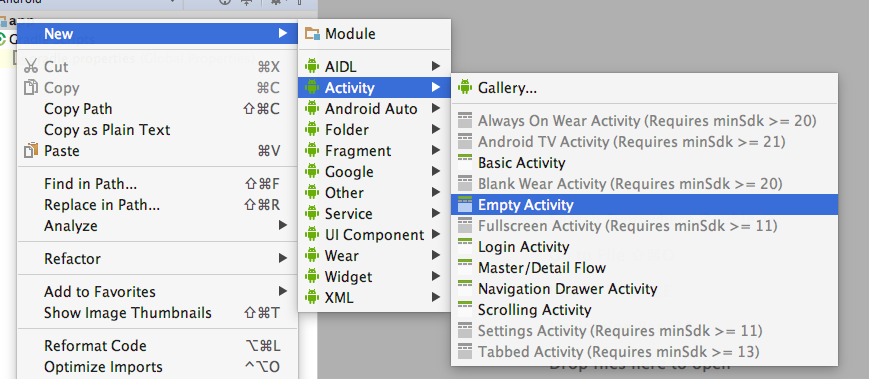
One you have the activity, you need to add menu items to open the activity. To do this, you'll add the xml for the menu item in detail.xml and forecast.xml in the menu folder. This makes the menu item appear, but doesn't make it do anything. To make it actually open the SettingsActivity you need to go to the onOptionsItemSelected in both MainActivity and DetailActivity and write an explicit intent to start the SettingsActivity:
        if (id == R.id.action_settings) {
            Intent startSettingsActivity = new Intent(this, SettingsActivity.class);
            startActivity(startSettingsActivity);
            return true;
        }
There are a few more small but important notes. Use android:launchMode="singleTop" to make sure that a new instance of MainActivity isn't spawned when you press the back button. Spawning a new instance of MainActivity is not memory efficient.
Then, in the actual SettingsActivity you should override the home button to act like the back button:
if (id == android.R.id.home) {
    onBackPressed();
}
and you should display home as up, to allow up navigation:
this.getSupportActionBar().setDisplayHomeAsUpEnabled(true);Solution Code
Solution: [S06.01-Solution-LaunchSettingsActivity][Diff]